In a previous post I mentioned that I was having problems kickstarting one of the appliances. Nothing can be more perplexing than something that was working fine, and then it stops working for no apparent reason! This must have been a driver issue; I either migrated the old kickstart environment incorrectly, or something in the hardware specs had changed and caused the kickstart to fail.
I found an error on the console during the installation (press alt+F2) that explained the problem, Kickstart could not find or load a network driver so it kicked out to a regular installation prompting me for a source for the install.
I tracked another older unit similar to this one and confirmed that the hardware had indeed changed, we had changed the motherboard, which comes with a different network device; we never got around to updating the drivers. So I had to build a new driver, in the same manner that my buddy Steve built a driver for this very same situation.
This applies to these Realtek Network cards: RTL8111B, RTL8168B, RTL8111, RTL8168, RTL8111C, RTL8111CP, RTL8111D(L), RTL8168C, RTL8111DP. I need a driver for this kernel: 2.6.9-42, running on CentOS 4.4
I got the drivers here: (http://www.realtek.com.tw/downloads/downloadsView.aspx?Langid=1&PNid=13&PFid=5&Level=5&Conn=4&DownTypeID=3&GetDown=false)
Then I got another appliance ready ((You really could use any Linux environment you have available, but I think its easier to have the same kernel running on the system when you compile it.)) and installed some of the necessary utilities to compile a new driver; gcc, make and anything else Yum got. Later on I found I needed the kernel-devel package as well.
I got the driver archive directly with wget by getting the URL from Download them all in Firefox ((Neat trick if you get those pesky javascript void redirects, and you can’t get the url.)) to avoid getting the driver then uploading it to the appliance.
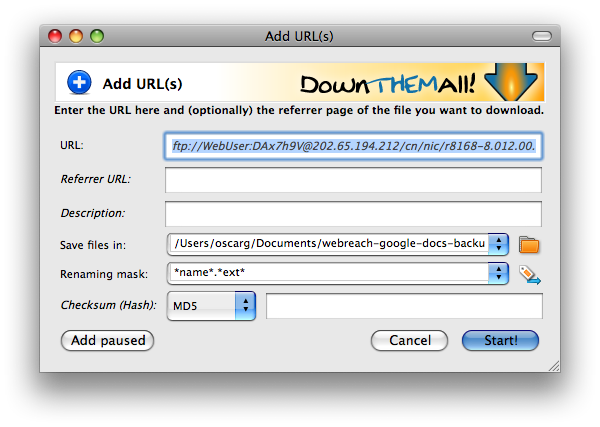
If you choose Download them all as the option for your download then you can just copy and paste the URL from the Download manager and give it to wget. This avoids having to download a file locally then uploading it where you need it if they are blocking the URL with javascript.
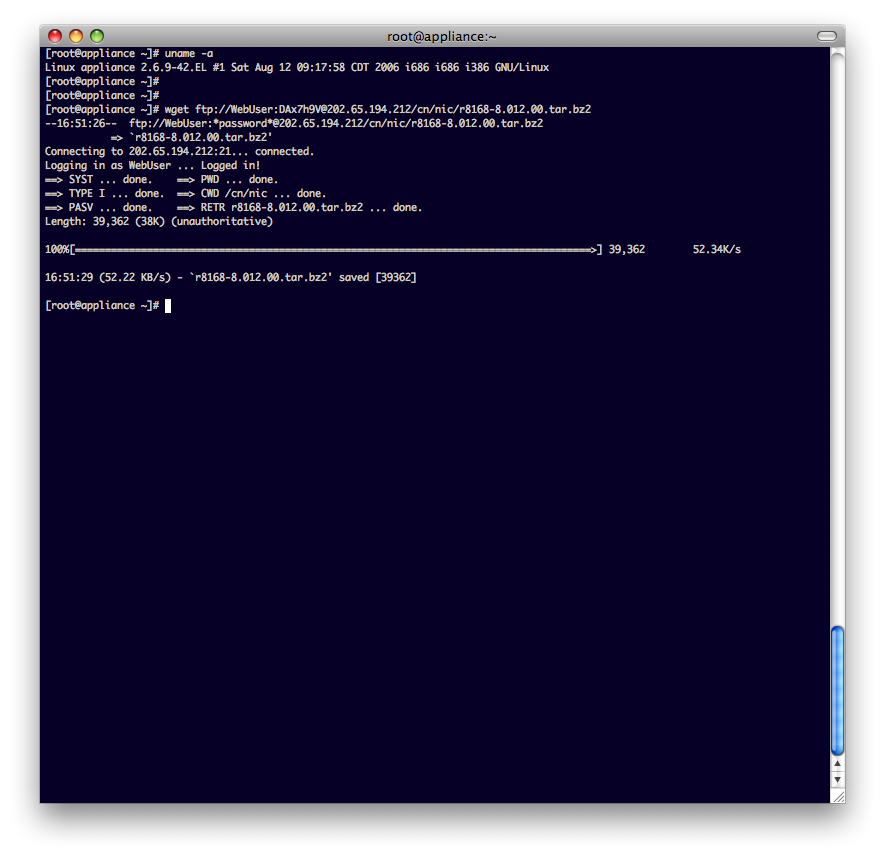
Shows how to pull the file with the URL you got from Download them All, you can see it logging in, getting the file and finishing gracefully
From here, follow through the read me that is in the file and I should end up with the driver that I need.
I got this error on the first command that the readme tells me to run.
/lib/modules/2.6.9-42.EL/build: No such file or directory. Stop.
I had to install the kernel-devel package for that kernel version, don’t use Yum because it will get the latest and it will not necessarily get the right one, your best option is to just install it from the original source ((We have an internal webserver with all the sources. Notice the 10.10.18.10 address corresponds to this internal server, you’ll have to find your own if you’re working through this. You can also use the rpms from the disk or wherever else you have them)) with:
rpm -ivh http://your-source-url/centos/x86/4.4/CentOS/RPMS/kernel-devel-2.6.9-42.EL.i686.rpm
Then I was able to build and continue with the instructions in the readme file.
Terminal log:
[root@appliance r8168-8.012.00]# rpm -ql kernel-devel| grep modules
/lib/modules/2.6.9-78.0.22.EL/build
/lib/modules/2.6.9-78.0.22.EL/source
/usr/src/kernels/2.6.9-78.0.22.EL-i686/include/config/modules.h
[root@appliance r8168-8.012.00]# uname -a
Linux appliance 2.6.9-42.EL #1 Sat Aug 12 09:17:58 CDT 2006 i686 i686 i386 GNU/Linux
[root@appliance r8168-8.012.00]# yum -y remove kernel-devel
Setting up Remove Process
Resolving Dependencies
–> Populating transaction set with selected packages. Please wait.
—> Package kernel-devel.i686 0:2.6.9-78.0.22.EL set to be erased
–> Running transaction check
Dependencies Resolved
=============================================================================
Package Arch Version Repository Size
=============================================================================
Removing:
kernel-devel i686 2.6.9-78.0.22.EL installed 12 M
Transaction Summary
Install 0 Package(s)
Update 0 Package(s)
Remove 1 Package(s)
Total download size: 0
Downloading Packages:
Running Transaction Test
Finished Transaction Test
Transaction Test Succeeded
Running Transaction
Removing : kernel-devel ######################### [1/1]
Removed: kernel-devel.i686 0:2.6.9-78.0.22.EL
Complete!
[root@appliance r8168-8.012.00]# uname -a
Linux appliance 2.6.9-42.EL #1 Sat Aug 12 09:17:58 CDT 2006 i686 i686 i386 GNU/Linux
[root@appliance r8168-8.012.00]# rpm -Ivh
-Ivh: unknown option
[root@appliance r8168-8.012.00]# rpm -ivh
Retrieving
Preparing… ########################################### [100%]
1:kernel-devel ######################################### [100%]
[root@appliance r8168-8.012.00]# make clean modulesmake -C src/ clean
make[1]: Entering directory /root/tmpdriver/r8168-8.012.00/src'
rm -rf \*.o \*.ko \*~ core\* .dep\* .\*.d .\*.cmd \*.mod.c \*.a \*.s .\*.flags .tmp\_versions Module.symvers Modules.symvers Module.markers \*.################################################################################
order
make[1]: Leaving directory/root/tmpdriver/r8168-8.012.00/src’
make -C src/ modules
make[1]: Entering directory /root/tmpdriver/r8168-8.012.00/src'
make -C /lib/modules/2.6.9-42.EL/build SUBDIRS=/root/tmpdriver/r8168-8.012.00/src modules
make[2]: Entering directory/usr/src/kernels/2.6.9-42.EL-i686′
CC [M] /root/tmpdriver/r8168-8.012.00/src/r8168_n.o
/root/tmpdriver/r8168-8.012.00/src/r8168_n.c:174: warning: MODULE\_PARM\_' is deprecated (declared at include/linux/module.h:552)
/root/tmpdriver/r8168-8.012.00/src/r8168\_n.c:175: warning:MODULE_PARM_’ is deprecated (declared at include/linux/module.h:552)
/root/tmpdriver/r8168-8.012.00/src/r8168_n.c:176: warning: MODULE\_PARM\_' is deprecated (declared at include/linux/module.h:552)
/root/tmpdriver/r8168-8.012.00/src/r8168\_n.c: In functionrtl8168_tx_clear’:
/root/tmpdriver/r8168-8.012.00/src/r8168_n.c:5005: warning: unused variable dev'
CC [M] /root/tmpdriver/r8168-8.012.00/src/r8168\_asf.o
/root/tmpdriver/r8168-8.012.00/src/r8168\_asf.c: In functionrtl8168_asf_time_period’:
/root/tmpdriver/r8168-8.012.00/src/r8168_asf.c:313: warning: ‘pos’ might be used uninitialized in this function
LD [M] /root/tmpdriver/r8168-8.012.00/src/r8168.o
Building modules, stage 2.
MODPOST
CC /root/tmpdriver/r8168-8.012.00/src/r8168.mod.o
LD [M] /root/tmpdriver/r8168-8.012.00/src/r8168.ko
make[2]: Leaving directory /usr/src/kernels/2.6.9-42.EL-i686'
strip --strip-debug r8168.ko
make[1]: Leaving directory/root/tmpdriver/r8168-8.012.00/src’
[root@appliance r8168-8.012.00]#
[root@appliance r8168-8.012.00]#
[root@appliance r8168-8.012.00]# make install
make -C src/ install
make[1]: Entering directory /root/tmpdriver/r8168-8.012.00/src'
install -m 744 -c r8168.ko /lib/modules/2.6.9-42.EL/kernel/drivers/net/
make[1]: Leaving directory/root/tmpdriver/r8168-8.012.00/src’
[root@appliance r8168-8.012.00]# ls src/
Makefile r8168_asf.c r8168_asf.o r8168.ko r8168.mod.o r8168_n.o
Makefile_linux24x r8168_asf.h r8168.h r8168.mod.c r8168_n.c r8168.o
[root@appliance r8168-8.012.00]#
[root@appliance r8168-8.012.00]#
[root@appliance r8168-8.012.00]# mv src/r8168.ko r8168.ko.2.6.9-42.EL
[root@appliance r8168-8.012.00]# make clean
make -C src/ clean
make[1]: Entering directory /root/tmpdriver/r8168-8.012.00/src'
rm -rf \*.o \*.ko \*~ core\* .dep\* .\*.d .\*.cmd \*.mod.c \*.a \*.s .\*.flags .tmp\_versions Module.symvers Modules.symvers Module.markers \*.order
make[1]: Leaving directory/root/tmpdriver/r8168-8.012.00/src’
[root@appliance r8168-8.012.00]# cp src/Makefile src/Makefile.orig
[root@appliance r8168-8.012.00]# vi src/Makefile
[root@appliance r8168-8.012.00]# make
make -C src/ clean
make[1]: Entering directory /root/tmpdriver/r8168-8.012.00/src'
rm -rf \*.o \*.ko \*~ core\* .dep\* .\*.d .\*.cmd \*.mod.c \*.a \*.s .\*.flags .tmp\_versions Module.symvers Modules.symvers Module.markers \*.order
make[1]: Leaving directory/root/tmpdriver/r8168-8.012.00/src’
make -C src/ modules
make[1]: Entering directory /root/tmpdriver/r8168-8.012.00/src'
make -C /lib/modules/2.6.9-42.ELsmp/build SUBDIRS=/root/tmpdriver/r8168-8.012.00/src modules
make: \*\*\* /lib/modules/2.6.9-42.ELsmp/build: No such file or directory. Stop.
make: Entering an unknown directorymake: Leaving an unknown directorymake[1]: \*\*\* [modules] Error 2
make[1]: Leaving directory/root/tmpdriver/r8168-8.012.00/src’
make: *** [modules] Error 2
[root@appliance r8168-8.012.00]# rpm -ivh
Retrieving
Preparing… ########################################### [100%]
1:kernel-smp-devel ###################################### [100%]
[root@appliance r8168-8.012.00]#
[root@appliance r8168-8.012.00]#
[root@appliance r8168-8.012.00]#
[root@appliance r8168-8.012.00]#
[root@appliance r8168-8.012.00]#
[root@appliance r8168-8.012.00]#
[root@appliance r8168-8.012.00]#
[root@appliance r8168-8.012.00]# makemake -C src/ clean
make[1]: Entering directory /root/tmpdriver/r8168-8.012.00/src'
rm -rf \*.o \*.ko \*~ core\* .dep\* .\*.d .\*.cmd \*.mod.c \*.a \*.s .\*.flags .tmp\_versions Module.symvers Modules.symvers Module.markers \*.order
make[1]: Leaving directory/root/tmpdriver/r8168-8.012.00/src’
make -C src/ modules
make[1]: Entering directory /root/tmpdriver/r8168-8.012.00/src'
make -C /lib/modules/2.6.9-42.ELsmp/build SUBDIRS=/root/tmpdriver/r8168-8.012.00/src modules
make[2]: Entering directory/usr/src/kernels/2.6.9-42.EL-smp-i686′
CC [M] /root/tmpdriver/r8168-8.012.00/src/r8168_n.o
/root/tmpdriver/r8168-8.012.00/src/r8168_n.c:174: warning: MODULE\_PARM\_' is deprecated (declared at include/linux/module.h:552)
/root/tmpdriver/r8168-8.012.00/src/r8168\_n.c:175: warning:MODULE_PARM_’ is deprecated (declared at include/linux/module.h:552)
/root/tmpdriver/r8168-8.012.00/src/r8168_n.c:176: warning: MODULE\_PARM\_' is deprecated (declared at include/linux/module.h:552)
/root/tmpdriver/r8168-8.012.00/src/r8168\_n.c: In functionrtl8168_tx_clear’:
/root/tmpdriver/r8168-8.012.00/src/r8168_n.c:5005: warning: unused variable dev'
CC [M] /root/tmpdriver/r8168-8.012.00/src/r8168\_asf.o
/root/tmpdriver/r8168-8.012.00/src/r8168\_asf.c: In functionrtl8168_asf_time_period’:
/root/tmpdriver/r8168-8.012.00/src/r8168_asf.c:313: warning: ‘pos’ might be used uninitialized in this function
LD [M] /root/tmpdriver/r8168-8.012.00/src/r8168.o
Building modules, stage 2.
MODPOST
CC /root/tmpdriver/r8168-8.012.00/src/r8168.mod.o
LD [M] /root/tmpdriver/r8168-8.012.00/src/r8168.ko
make[2]: Leaving directory /usr/src/kernels/2.6.9-42.EL-smp-i686'
strip --strip-debug r8168.ko
make[1]: Leaving directory/root/tmpdriver/r8168-8.012.00/src’
make -C src/ install
make[1]: Entering directory /root/tmpdriver/r8168-8.012.00/src'
install -m 744 -c r8168.ko /lib/modules/2.6.9-42.ELsmp/kernel/drivers/net/
make[1]: Leaving directory/root/tmpdriver/r8168-8.012.00/src’
[root@appliance r8168-8.012.00]# ls src/
Makefile Makefile.orig r8168_asf.h r8168.h r8168.mod.c r8168_n.c r8168.o
Makefile_linux24x r8168_asf.c r8168_asf.o r8168.ko r8168.mod.o r8168_n.o
[root@appliance r8168-8.012.00]# mv src/r8168.ko r8168.ko.2.6.9-42.ELsmp
[root@appliance r8168-8.012.00]# ls -l
total 172
-rw-r–r– 1 root root 1789 Mar 25 08:07 Makefile
-rw-r–r– 1 root root 65068 Jun 2 17:57 r8168.ko.2.6.9-42.EL
-rw-r–r– 1 root root 64168 Jun 2 18:06 r8168.ko.2.6.9-42.ELsmp
-rw-r–r– 1 root root 4425 Jan 6 10:33 readme
drwxr-xr-x 3 root root 4096 Jun 2 18:08 src